


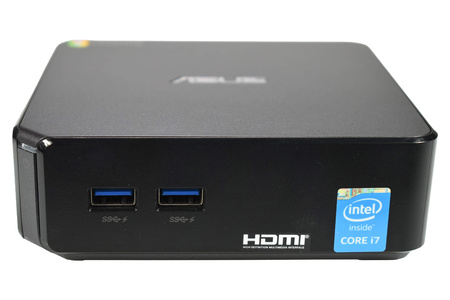
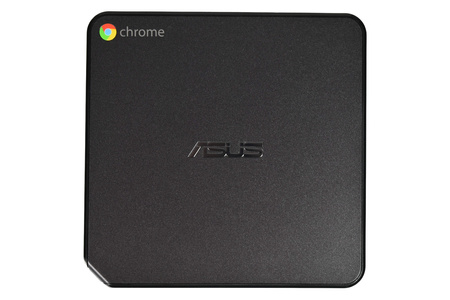
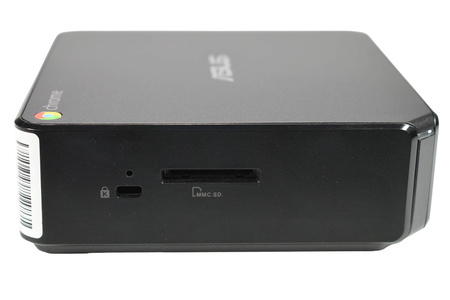
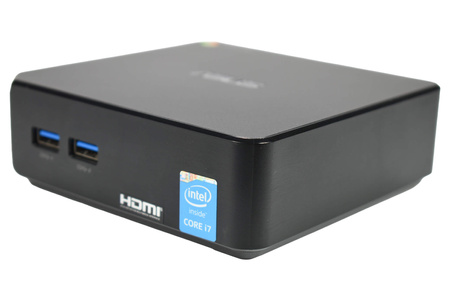
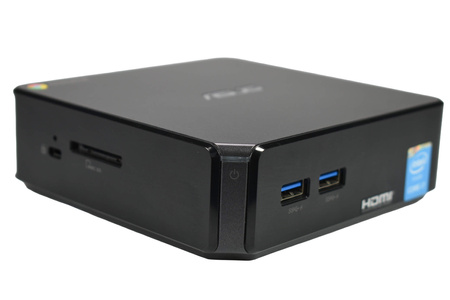
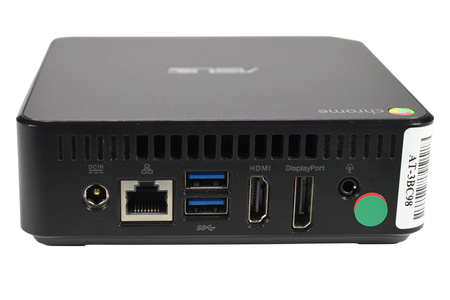


ASUS Chromebox CN62 Micro with Intel Core i7-5500U, 8 GB RAM, 16 GB SSD, Intel HD Graphics 5500, and Chrome OS
- Processor: i7-5500U
- Memory: 8 GB
- Storage driver: 16 GB SSD
- Form factor: Micro
- Graphics card: Integrated
 30 days
return policy
 Warranty
up to 2 years
 Equipment
ready to go



Used product – checked, cleaned and prepared for further use.
May show signs of use, consistent with its quality grade.
Data has been professionally erased using certified Blancco software.
Technical condition: 100% functional – after full diagnostics performed by specialists.
Ready to use immediately after purchase.

90-Day Warranty!
The product you are currently viewing comes with a 90-day warranty. This allows you to feel safe and confident when shopping with us.
We understand how frustrating extended repair times can be, so in case of any issues, we offer full customer support to quickly and efficiently resolve any situation. Our team is always ready to help, ensuring that you can always count on us.
ASUS Chromebox CN62 – a compact mini PC for everyday use
The ASUS Chromebox CN62 is a compact desktop computer running Chrome OS that combines ease of use with a very space-efficient design for your desk. This solution is for individuals and businesses that need a high-performance tool for browser-based work, managing email, using cloud services, or playing videos—without having to fit a large tower-style computer case under their desk.
The Chromebox was designed for everyday tasks. It does not require complicated setup or specialized knowledge. Just plug in a monitor, keyboard, and mouse, sign in to your Google account, and you can start working right away. As a result, it works well at home, in the office, at school, or at a customer service desk.
A compact design that doesn't take up much space
The biggest advantage of the ASUS Chromebox CN62 is its design. The square, low-profile case takes up only slightly more space than an external driver or a router. You can place the computer next to the monitor, on a shelf, or in a cabinet—anywhere where organization and free space on the desk are important.
The dark, matte casing with its understated look fits well in a modern office, classroom, reception area, or home office. The device doesn't stand out in its surroundings and blends in well with other equipment. This is especially important in places where the computer is visible to customers or guests.
The compact case also makes it easier to carry the computer. If the office layout changes or a workstation needs to be moved to another room, you can simply unplug the Chromebox, take it with you, and plug it in at the new location.
Chrome OS – a simple and intuitive operating system
The device runs Chrome OS—an operating system centered around the Chrome browser. The interface is clear and intuitive, so even people who don't have much experience with computers can use it with ease.
Chrome OS works best when used with web apps and cloud services. You can create and edit documents, spreadsheets, and presentations directly in your browser, and store your files in your online account. This makes it possible to access them from other devices as well, so your work isn't tied to a single computer.
The system allows you to use multiple user accounts on a single device. Each person logs in to their own account and has access to their settings, bookmarks, and files. This is a practical solution for families, schools, or offices where several people share a single workstation.
Typical day-to-day tasks
The ASUS Chromebox CN62 was designed with the everyday tasks that most users perform in mind. It's perfect for:
- browsing the Internet – searching for information, reading the news, shopping online, and using online banking,
- email management – in a web browser or in web-based applications,
- online office work – creating and editing documents, spreadsheets, and presentations in browser-based applications,
- cloud computing – using online drivers, calendars, and collaboration tools,
- video playback – watching movies, training materials, or presentations.
This is a computer for people who value simplicity and want to focus on their work rather than on operating the device itself.
Versatile Applications
Thanks to its compact size and ease of use, the ASUS Chromebox CN62 is suitable for use in many settings:
- Office: as a workstation for handling email, documents, and web applications, especially in situations where a tidy desk is important.
- School and Education: in classrooms, libraries, and labs where students and teachers primarily use online resources.
- Remote work: as a home workstation for use with a web browser and cloud services.
- Reception and Customer Service: for managing reservation systems, calendars, or web applications used within the company.
- Information screen: such as a computer connected to a monitor or TV that displays content in a store, waiting room, or office.
- Home: as a simple home computer for browsing the Internet, checking email, and watching movies.
Easy connection and quick setup
Setting up a Chromebox is very easy. Just connect the monitor, keyboard, and mouse, and then turn on the device. The system will guide you through a few basic setup steps, such as selecting a language, connecting to a network, and signing in to your account.
Once you've logged in, your computer is ready to use. You don't need to install many additional programs, since most tasks can be performed directly in your browser. This saves a lot of time, especially when you need to set up several workstations at the same time.
You can connect the Chromebox to both a standard computer monitor and a TV. This makes it easy to adapt it to the conditions of any given location—from a home office desk to a conference room.
Convenient access to front-panel connectors
The front of the case features USB ports that make it easy to quickly connect a flash drive, card reader, or other accessories. You don't have to reach for your computer or move it to transfer files or connect a device for a moment.
The other ports, designed for permanent connection to a monitor, the network, or a power source, are located on the back of the case. This allows cables to be routed neatly, keeping the workspace organized.
Tested and Refurbished Equipment
Every device offered by Device Europe undergoes a testing and preparation process before it is sold. We test its performance within the specified range, and the equipment is sold as fully functional based on our tests.
The scope of testing is the same for all devices, regardless of their visual condition class. This means that a lower-end computer is tested just as thoroughly as a top-of-the-line device. For me, the difference between gradeis mainly in the appearance—that is, signs of wear on the case.
Refurbished Equipment—A Smart Choice
When you choose a refurbished device, you get reliable equipment at an affordable price. This is a good solution for individuals, schools, and businesses that want to equip their workstations without incurring significant expenses.
When you buy a refurbished device, you also extend the useful life of your existing equipment. A computer that still performs its tasks well can continue to serve a new user.
Who is the ASUS Chromebox CN62 designed for??
- For people looking for a simple computer for browsing the web, checking email, and working in a web browser.
- For companies that want to equip their office workstations or reception areas with compact computers.
- For schools and educational institutions that primarily use online resources.
- For people who work remotely and need a well-organized workspace at home.
- For everyone who appreciates compact size and ease of use.
Summary
The ASUS Chromebox CN62 is a compact mini PC that combines a small form factor, ease of use, and versatility. Thanks to Chrome OS, it works well with web apps and cloud services, and its compact design lets you place it almost anywhere. We inspect every device and prepare it for continued use—so you can plug it in right away and get to work.
You can find the detailed technical specifications for the selected configuration in the specifications below.
 More options